
TL;DR
AI accelerates security work, but it doesn't replace the judgment that turns a pattern into a finding. This walkthrough of a real web application assessment shows where AI delivered, where it confidently got it wrong, and why the 20% of work that requires a human expert is still the part that matters most.
There is a lot of noise right now about AI in security. Depending on which article, podcast, or TikTok you come across, AI is either about to replace penetration testers or not be useful at all.
My experience on real security engagements has been somewhere in the middle.
Through these engagements, what AI provided was speed. It helped me process information faster, explore more paths, and spend less time on repetitive tasks. I don't think anyone's favorite part of an assessment is spending half a day tracing a parameter through five services, three repositories, and two cans of Red Bull only to discover that the value gets sanitized before it reaches anything interesting. Instead of reducing the work, AI let me spend more of it on the parts that actually require judgment.
As a security consultant at Bishop Fox, I recently completed a security assessment for a web application. For the source-code review, I used AI extensively, primarily Claude with access to the source code repositories. AI did not replace the work I do as a consultant. I was still responsible for reviewing results, validating findings, testing assumptions, and making the final decisions.
This blog isn't a hot take about AI being overhyped or AI being the future. It's a walkthrough of a real assessment and how AI fits into the process. AI got me roughly 80% of the way there, but the final 20% was where the real security work happened.
Everyone uses AI tools a little differently, and my approach here isn't the perfect way or the only way. It's simply meant to show the role AI played in the process, and the continued importance of security experts.
The two strongest findings from the assessment showed that balance clearly. AI identified both quickly, but in each case, the engagement stalled until I found a non-obvious way to extract data and demonstrate impact.
What AI Does Well
The assessment covered both a live application and roughly 30 source repositories, and this is where AI delivered the most value. I used it to trace how requests moved through the application, identify entry points, follow data flows, and translate unfamiliar code into something I could reason about quickly. Tasks that might have taken hours or even days of manual searching could often be reduced to minutes.
This is the boring 80% of the work. AI helped me understand the codebase faster, but what it didn't do was determine whether a bug actually mattered, separate real findings from false positives, recognize how multiple issues could be chained together, or demonstrate real impact. That's where the rest of the assessment began.
Turning a Verification Bypass into Unlimited Accounts
The first finding started as what looked like a straightforward phone-verification bypass.
AI quickly identified a server-side check that trusted two HTTP headers to determine whether a user had completed SMS verification. By spoofing the expected values, the application treated a user as verified without ever completing the verification process.
That alone was a legitimate finding. AI found it quickly, I validated it, and the issue had a clear root cause and remediation path.
The obvious conclusion was that the impact was limited because users still needed a valid invitation code to activate their account. The UI kept redirecting me to the activation page, and I couldn't meaningfully interact with the rest of the application until activation was complete. Some of the APIs were restricted or blocked for the same reason.

At first glance, it looked like a user could bypass one step in the registration process only to get stuck at the next. AI reached that conclusion, and honestly, I almost did, too.
Instead of writing it up, I kept reviewing other endpoints and responses. The bypass was real, but I wasn't convinced I had found its full impact. After a few hours intercepting application traffic through Burp, one endpoint returned a user's personal invitation code, and once I started exploring how invitation codes worked, the picture changed. A legitimately activated account could retrieve an invitation code with an effectively unlimited usage count! Combined with the phone-verification bypass, the impact changed completely.
With a single legitimate account able to now activate unlimited new accounts by reusing invitation codes alongside the bypass. Those newly activated accounts would then receive their own invitation codes, creating a self-reproducing chain.
The vulnerability AI found was real. But the higher-impact finding came from connecting it to a second behavior that AI had already seen and dismissed.
When AI Gives a Confident, Yet Impossible Explanation
While validating the proof of concept, the bypass appeared unreliable. Sometimes the application would advance past the phone-verification screen and move on to activation; other times it would remain stuck, even with the exact same HTTP headers driving the bypass.
AI proposed several explanations, and one of them sounded perfectly reasonable: that sending a request through Burp Repeater was somehow affecting the application's frontend state. The explanation used all the right terminology—state machines, route guards, response handlers—and on the surface, it sounded plausible.
It was also impossible.
Burp Repeater sends requests directly from Burp, not from the browser. The browser never sees those requests, the application's JavaScript never processes the responses, and the frontend cannot update its state based on traffic it never receives. The explanation required the UI to react to something it was physically incapable of observing.
The real answer turned out to be entirely server-side.
After some digging, I found the real culprit: a two-minute Redis cache on the UserInfo response, an endpoint that returns information about the current user's account. The first UserInfo request after email verification determined whether smsVerified was cached as true or false, and every subsequent request inherited that value until the cache expired. The bypass wasn't unreliable at all. It was a timing issue.
That distinction matters.
The source code contained all the pieces: the Redis caching, the UserInfo handler, and the verification logic. But the actual failure mode only became obvious when viewed through live application behavior. The bug wasn't in any single file. It was in the timing relationship between several moving parts, and understanding it required testing, observation, and a healthy amount of skepticism toward a very confident explanation AI initially proposed.
AI later explained the behavior correctly—coincidentally, only after I told it the answer.
Two SSRF Candidates, Only One Real
The second finding followed a different path.
During source review, AI identified two separate endpoints that accepted user-supplied URLs and caused the application to fetch them from the backend environment. Both appeared to be potential SSRF candidates, and at first glance they looked nearly identical: both accepted a URL, both retrieved content, and both seemed capable of making outbound requests.
This is where AI stopped and called it a day. I wasn't satisfied. Rather than celebrating two SSRFs, I traced the execution paths to understand who was actually performing the fetch—and that distinction turned out to matter far more than the SSRF pattern itself.
One endpoint performed OCR on images, extracting text from image content. Following the code path revealed that the supplied URL was ultimately handed off to Google Cloud Vision, meaning Google's infrastructure performed the request, not the customer's environment. While technically interesting, it was effectively a dead end from a practical SSRF perspective. Google's service handled the supplied URLs as expected and didn't expose access to its internal infrastructure, and because the request originated from Google's environment rather than the customer's, it couldn't meaningfully interact with the customer's internal services, localhost interfaces, or cloud metadata endpoints. After walking through the evidence, AI reluctantly agreed that one of its two SSRFs was no longer a SSRF.
The second endpoint, used for image generation, followed a very different code path. Reviewing the implementation revealed that it performed a direct HTTP request from inside the customer's environment without meaningful URL validation, which meant it could reach internal resources that external users could not.
This was the real SSRF.
The initial tests were straightforward. Internal services responded, cloud metadata endpoints responded, and DNS lookups occurred from inside the environment. Unfortunately, every attempt seemed to end the same way: failed to generate image due to errors:
400 Bad Request
401 Unauthorized for http://169.254.169.254/latest/meta-data/
tls: failed to verify certificate: x509: certificate signed by unknown authority
dial tcp: lookup unknown123.com: no such host
Get "169.254.170.2/v2/metadata": unsupported protocol scheme
404 Not Found
FIGURE 2 – Error messages in the HTTP response
The requests were undoubtedly being made, but the problem was getting anything useful back.
To confirm the behavior, I pointed the application at a Burp Collaborator domain and received callbacks directly from the customer's infrastructure. The SSRF was real, and the server was making requests exactly where I told it to.
I just couldn't retrieve meaningful data through the application.
At that point, AI suggested the vulnerability was likely a blind SSRF. The server could reach internal resources, but there didn't appear to be a practical way to extract the responses.
From Blind SSRF to Data Extraction
Fortunately, I opened another Red Bull and gave AI a break. Instead of closing the finding, I kept poking at the request fields. After fuzzing and changing values, I noticed that a mime_type field in the POST request body was fully controllable and changing it from image/png to text/plain made all the difference.
A quick test using https://icanhazip.com as the URL parameter in the request returned the backend server's IP address rendered directly into a generated image.
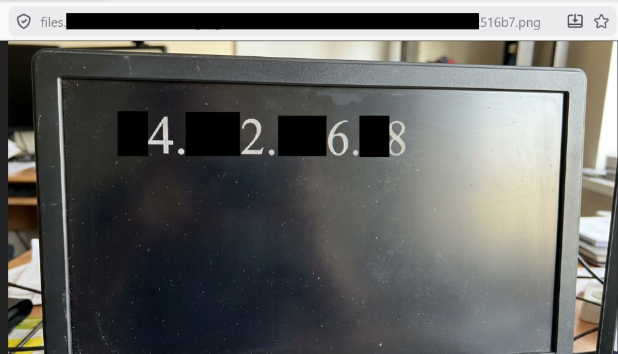
Of course, I redacted the IP address. And no, the blurry person in the image is not me.
At that point, I went back to the source code to understand why this worked.
The application wasn't simply fetching remote content; it was taking the fetch response, encoding it, and passing it to Gemini along with that client-controlled content type.
That small detail changed everything.
To prove it, I pointed the vulnerable endpoint at http://localhost:6060/debug/pprof/cmdline, a Go runtime diagnostic endpoint exposed locally on the server. I used the /cmdline endpoint because the output was easy to demonstrate, but it wasn't the only thing accessible. Other pprof endpoints were also reachable and exposed additional diagnostic information. The response was fetched from localhost, passed through the application's processing pipeline, and ultimately rendered directly into the generated image:
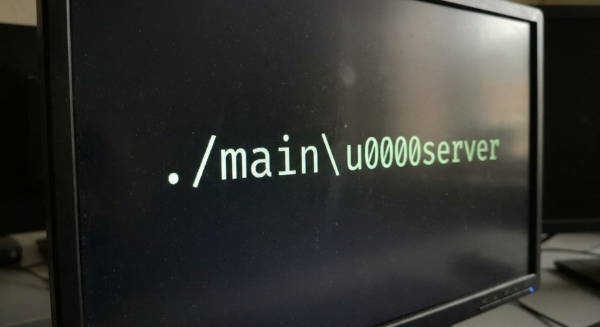
The response contained the command-line arguments used to start the application and was rendered directly into the generated image.
The SSRF had gone from blind to a practical way of extracting data.
The vulnerability itself wasn't particularly difficult to find. The difficult part was understanding how the surrounding system processed the response and identifying a path that turned what looked like a dead-end error message into meaningful impact.
AI found the bug. I gave it a pat on the back and went looking for the impact.
Why AI Sounds Most Confident When It’s Wrong
One lesson appeared repeatedly throughout the assessment: AI often sounds most confident when it should be the least. Sometimes, it's only one step away from confidently telling you the answer is 42.
When a model doesn't know the answer, it can still produce something that looks remarkably like one. The explanation may use the right vocabulary, reference the correct technologies, and follow a logical structure—but none of that makes it correct.
The defense is simple: verify everything.
Anything AI tells you about system behavior should be tested against the system, and anything AI tells you about code should be verified against the code. Confidence is not evidence.
The Difference Between an AI-Found Bug and a Human-Validated Finding
The most important lesson from the engagement was that AI is excellent at finding patterns that resemble vulnerabilities, but it’s much less effective at determining whether those patterns matter in a specific application context.
Throughout the assessment, AI surfaced a number of candidate findings that ultimately didn't belong in the report. Some looked like authorization issues until additional context was reviewed; others resembled path traversal, CSRF, or session-management flaws but broke down once the surrounding controls were understood.
A security expert who hands AI-generated findings to a customer without doing this triage will produce a report full of work the customer's engineering team will reject in the first review meeting. That damages trust in a way that's harder to recover from than a missed finding. A customer can forgive you for not finding something; they will not forgive you for sending them down a rabbit hole on a non-issue.
That triage process remains one of the most valuable things a human expert provides because customers don't pay for a list of theoretical possibilities; they pay for an accurate assessment of risk.
Where AI Fits in Security Testing
The biggest lesson from this assessment wasn't that AI can find vulnerabilities. We already know it can.
Instead, the lesson was that AI is very good at finding patterns and very bad at deciding which patterns matter.
AI gets me to the starting line faster, but it doesn't run the race for me.
The role I see AI playing today, and likely for the foreseeable future, isn't replacing humans; it's helping us move through the repetitive parts faster while leaving the validation, prioritization, and decision-making to us.
While AI finds patterns, security experts decide which of them matter.
For more resources on how Bishop Fox keeps humans in the loop on AI-powered application security testing, check out this case study and our datasheet.

Subscribe to our blog
Be first to learn about latest tools, advisories, and findings.
Thank You! You have been subscribed.
Recommended Posts
You might be interested in these related posts.