

TL;DR
This analysis demonstrates how to bypass .NET MAUI's platform-specific packaging to extract readable C# assemblies from both Android and iOS. By leveraging our published mauidll tool for Android payload extraction, researchers can leverage a single extraction pipeline to identify critical vulnerabilities in shared logic.
Getting Started
Cross-platform frameworks keep showing up in mobile development, and lately, one name caught my attention: .NET MAUI. Microsoft's successor to Xamarin.Forms lets a single C# codebase target iOS, Android, Windows, and macOS by compiling a shared project into Intermediate Language (IL), which the .NET runtime then executes on each platform through a thin native bridge. Every time a framework promises "write once," we ask the same follow-up question: does that also mean "break once, break everywhere"?
This post walks through how the framework's architecture creates specific failure modes, applying penetration testing principles to uncover the vulnerability patterns that arise when a shared C# layer sits underneath two "native" apps.
Understanding the Target
On Android, that runtime is Mono; on iOS, it's typically compiled ahead of time (AOT) because Apple's platform doesn't allow Just-In-Time Compilation (JIT) in App Store builds. In both cases, the business logic, models, view logic, and often the networking and storage code all live in the same shared assembly.
That single point of convergence is the whole story. In a classic setup, an iOS team writes Swift and an Android team writes Kotlin, and the two codebases drift; while this increases development overhead, it also means a bug on one platform doesn't automatically exist on the other. MAUI collapses that separation. From an attacker's chair, that's appealing: reverse-engineer the shared assembly once, and the resulting insight applies to both app store listings.
Architecture Differences
The true attack surface of a MAUI app is determined by how the shared C# logic interacts with platform-specific implementations during multi-targeting. Platform-specific behavior is written once in the shared project but resolved at compile time through multi-targeting: each platform build is compiled against its own platform-specific implementation file. A call like SecureStorage.SetAsync() looks identical in the shared C#, but the iOS binary ends up talking to the Keychain while the Android binary talks to the Keystore. I treat abstractions like this as a black box until proven otherwise, and black boxes are where misconfigurations hide.
Comparative Security Landscapes: Native vs. Managed Code
To understand the risk, we must contrast MAUI's managed runtime against its native targets.
iOS (Swift/Objective-C): Apps compile to native machine code, run inside a tightly controlled sandbox, and ship as encrypted binaries via the App Store. Static analysis on a stock IPA takes real work: tools like Hopper, IDA, or Ghidra can lift the disassembly into readable pseudocode, but you're reconstructing renamed variables and inferred control flow, not recovering the original source.
Android (Java/Kotlin): APKs contain DEX bytecode that decompiles cleanly with tools like JADX, which is why Android has long been the more forgiving starting point for mobile reverse engineering. Even here, though, ProGuard/R8 obfuscation raises the bar.
The MAUI middle ground: A MAUI assembly sits closer to the Android end of that spectrum than one can expect, on both platforms. Absent trimming and obfuscation, the class names, method names, string constants, and control flow can come back looking close to what the developer originally typed, on the iOS build just as readily as the Android one.
The Offensive Toolkit: Static and Dynamic Analysis
When assessing a MAUI application, the methodology splits into three tracks that reinforce each other.
Static analysis starts with pulling the shared assemblies out of the IPA or APK and loading them into a .NET decompiler such as ILSpy. The scope is not limited to the OWASP Mobile Top 10, involving a deep-dive investigation into the entire attack surface, integrating multiple OWASP security principles and a rigorous search for common CWE patterns. This includes hunting for everything from hardcoded secrets and weak cryptography to complex insecure deserialization and broken authorization logic that reveals how the app expects the backend to behave.
Dynamic analysis puts the app in motion. I proxy the traffic to see what the shared network layer is actually sending, which frequently surfaces certificate pinning implementations, custom encryption schemes, or API behavior that static review alone wouldn't catch. Beyond the network, this allows for monitoring filesystem writes to detect improper data storage, auditing deep-link handlers, and conducting active input testing with SQL injection and XSS payloads. Additionally, it enables log review and verification of how the app interacts with the Android Keystore or iOS Keychain.
Instrumentation ties the two together. Frida lets me hook into the running .NET runtime, bypass certificate pinning, patch out biometric checks, or manipulate in-memory application state, all without needing a jailbroken or rooted device in some cases. Because MAUI's method names often survive decompilation intact, hooking a MAUI method is often as simple as targeting its fully qualified name directly, rather than pattern-matching against stripped symbols the way I would on a heavily obfuscated native binary.
From APK to Readable Code
Here's the actual pipeline against an Android MAUI app.
Fingerprinting
AndroidManifest.xml is binary, but plain strings still gets at it:
$ strings target.apk | grep -i "maui" --color
...omitted for brevity...
Microsoft.Maui
Microsoft.Maui.Controls
Microsoft.Maui.Graphics
...omitted for brevity...
The output contains several references to MAUI libraries and components, and the crc64<hash>.ClassName pattern is the Java Callable Wrapper naming convention .NET for Android generates for any C# type that subclasses a Java type, a fingerprint that survives even if the rest of the manifest gets obfuscated.
Split-APKs
If working with bundles, unzipping the base APK from the app's bundle will show no lib/ directory at all: no native libraries, no Mono runtime, nothing to extract. Modern app bundles split native libraries out per-ABI into separate config.<abi>.apk files.
AOT
lib/arm64-v8a/ is full of files named libaot-<AssemblyName>.dll.so. Tempting to point ILSpy at one since the name says "dll," but it won't open:
$ file libaot-AcmeRemote.App.dll.so libaot-AcmeRemote.App.dll.so: ELF 64-bit LSB shared object, ARM aarch64, stripped $ nm -D libaot-AcmeRemote.App.dll.so 0000000000182eb8 D mono_aot_file_info
That's real compiled ARM64 machine code, Mono's ahead-of-time native stub, shipped "next to the original assembly" for faster cold starts. Because it is not a .NET assembly, no .NET decompiler will recognize it.
Finding and extracting the real target. The managed assemblies live in a second file, variations of libassembly-store.so, libassemblies.<abi>.blob.so, wrapped inside a non-standard ELF section named payload:
$ strings -a libassembly-store.so | grep -o -m1 XALZ
XALZ
XALZ is a per-assembly wrapper: the .dll bytes are LZ4 block-compressed.
To streamline the complex process of locating the payload, calculating the correct offset, and performing the extraction, I developed a custom utility called mauidll.
$ ./mauidll libassembly-store.so
...omitted for brevity...
AcmeRemote.AcmeNet.dll: 49272 -> 92672 bytes, valid PE
AcmeRemote.App.AcmeNet.dll: 14804 -> 29696 bytes, valid PE
ZeroConfTemp.dll: 8463 -> 13824 bytes, valid PE
AcmeRemote.App.dll: 152748 -> 386048 bytes, valid PE
Extracted 136 entries, valid PE (MZ) after extraction: 136/136
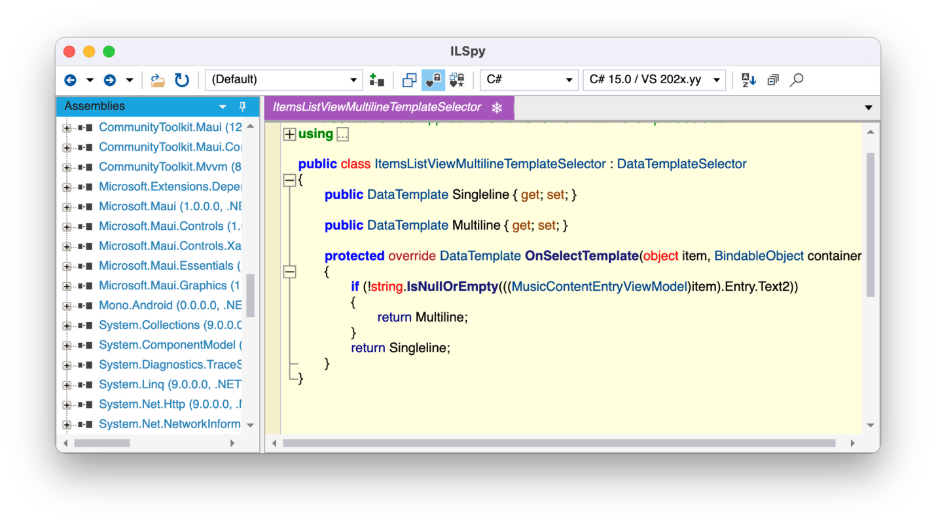
At this point the DLLs are ordinary .NET assemblies on disk, and ILSpy opens them correctly.
The iOS Equivalent
An IPA is a zip file too, Payload/<AppName>.app/ once extracted, and the packaging story diverges from Android. Before you go looking for an Android-style assembly store that isn't there, iOS's Mono AOT compiles ahead of time by Apple mandate, but the compiled native code links directly into the main executable rather than shipping as separate per-assembly loadable files. There's no equivalent of the libassemblies.*.blob.so split, and no ELF-payload either.
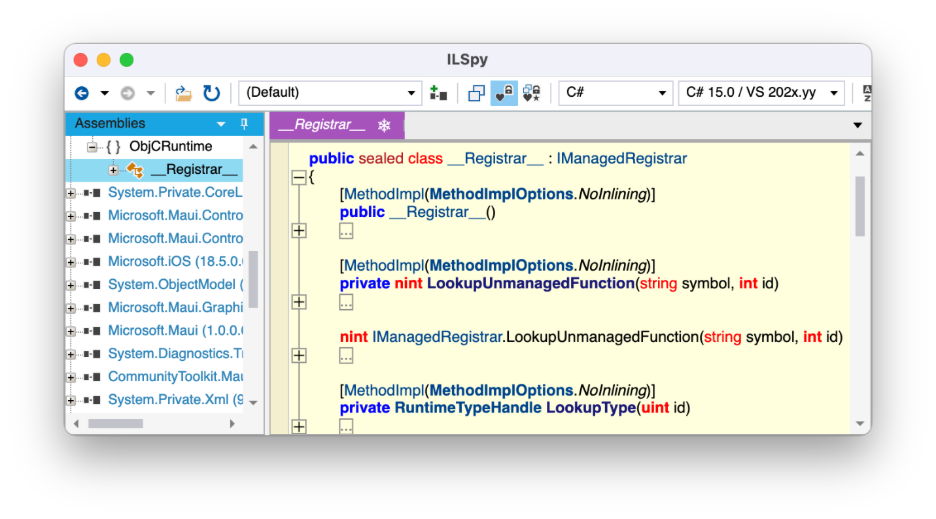
What that means in practice: the original managed assemblies typically still ship as loose .dll files directly inside the .app bundle, sitting alongside the main executable rather than hidden inside a second binary format, making loading the files in ILSpy a simpler process.
The Unified Attack Surface
While the methodology for auditing the resulting assemblies mirrors standard mobile penetration testing, the strategic advantage here is the unification of the target.
Once the shared assemblies are extracted, the effort required to audit the Android side is effectively "reused" to compromise the iOS side simultaneously. This allows the focus to shift away from the platform-specific extraction struggle and toward a much more efficient, high-leverage hunt for the specific flaws inherent in a shared .NET MAUI codebase.
High-Impact Vulnerability Patterns in MAUI
Across the assessments I've run, these patterns come up consistently. I've ranked them from most to least likely to appear.
- High-fidelity decompilation of Intermediate Language. While not really a vulnerability on its own, this is the root cause behind most of what follows. Because standard release builds rely on Mono AOT rather than true Native AOT, the shipped assemblies still contain readable IL, and ILSpy can turn them back into something very close to the original C# (method names, class structure, string literals, and control flow all survive). It's the single highest-leverage finding because it unlocks everything else on this list.
- Hardcoded secrets in shared assemblies. Because the shared project is the one place developers write code once for both platforms, it's also the one place they're most likely to drop an API key, a connection string, or a hardcoded encryption salt "temporarily," and then ship it. A decompiled assembly makes these trivial to extract, and because the assembly is shared, the same secret is now exposed on both storefronts simultaneously.
- Over-reliance on SecureStorage abstractions. MAUI's
SecureStorageAPI wraps the iOS Keychain and Android Keystore behind a single interface, and that convenience becomes the risk: teams assume the abstraction handles hardware-backed protection, biometric gating, and secure enclave usage automatically. It doesn't, by default. Sensitive tokens frequently end up protected by nothing more than the platform's baseline storage encryption. - Single point of failure via shared logic. An improper authorization check, a flawed session validation routine, or a broken cryptographic comparison written once in the shared layer is present on iOS and Android from the moment it ships. In native development, a fix or a fumble on one platform is isolated; in MAUI, there is no isolation to rely on.
- NuGet supply chain exposure. MAUI projects lean heavily on NuGet for cross-platform functionality, and every dependency pulled into the shared project inherits the same blast radius as first-party code. An outdated or compromised package introduces risk to both mobile releases at once, which is a meaningfully different calculus than vetting a CocoaPod and a Gradle dependency separately.
Conclusion
None of this makes .NET MAUI a bad choice for cross-platform development, it just means the security model has to account for the architecture. While it won't stop us, as offensive security engineers from finding vulnerabilities, a few things consistently move the needle for the apps we work with:
- Layered defense-in-depth. Obfuscation (renaming, string encryption) alongside runtime integrity checks (jailbreak/debugger detection) raises the barrier for automated tools. Neither makes an application un-reversible; they just increase the manual effort required to get there.
- Treat the shared assembly as public. Move secrets, business rules that matter for security, and validation logic server-side wherever feasible, and assume anything left client-side will eventually be read.
- Don't trust SecureStorage by default. Layer in biometric gating and verify hardware-backed storage is actually in use on both platforms rather than assuming the abstraction handles it.
- Audit NuGet dependencies with the same rigor as first-party code, since a shared project multiplies the impact of a single compromised package.
- Test both platforms as one attack surface, not two. A finding in the shared layer needs one fix, but it also needs verification on both release builds.
"Write once, run anywhere" is a genuine engineering win. It's also a reminder that in security, consolidation cuts both ways: fix a shared bug once, and you've fixed it everywhere, but ship one, and the same is true.

Subscribe to our blog
Be first to learn about latest tools, advisories, and findings.
Thank You! You have been subscribed.
Recommended Posts
You might be interested in these related posts.
From Fork to Framework: What Modifying Apollo Taught Us About Agent Invasion
MikroTrick: Inside the RouterOS Takeover Chain
CVE-2026-82329: Unauthenticated Administrative Access in JFrog Artifactory via an Empty Cluster Join Key

