
TL;DR
Used an AI-assisted pipeline to hash, correlate, and enrich a favicon signature set. Sharing some of the dataset, the methodology, and a primer on favicons and why they are worth fingerprinting in the first place. The accompanying repo will carry the dataset, and any longer-form technical content: github.com/BishopFox/Favicons.
I've always thought Favicons were neat, and about a year ago I made a competitive game where people would try to identify favicons. The game gathered the same kind of information as the initial workflow and in showing the game off I was told - you should just make AI play the game and do the guesses. Done.
Every browser tab, bookmark, and saved shortcut shows a small icon most people never think twice about. That icon (aka the favicon) turns out to be a useful fingerprint on the internet. It is small, static, and rarely changed, which makes it a durable signal for identifying what software a host is running and where else that same software shows up.
I built an AI-assisted pipeline to hash, correlate, and enrich favicons at scale, and this post shares part of that dataset, the methodology behind it, and a primer on why favicons are worth fingerprinting in the first place.
Favicon 101
Favicons (short for favorite icon) are graphics in the corner of browser tabs, bookmarks, and mobile screen shortcuts. There is no RFC and nothing that sets the type. Favicons fall under the rules for links and are covered under The HTML Living Standard.
Browsers support favicons as an .ico, .png, .jpg, .svg;. Firefox also supports them as a gif, because why not.
Some applications don’t have a single favicon; they have several. And while the HTML Living Standard suggests browsers choose the last icon link on the page, browsers can ultimately choose whichever one they think is most appropriate.
That loose standard is exactly what makes favicons useful to fingerprint. But to fingerprint anything at scale, you first need a way to reduce an image to a single comparable value, and that is where the hash comes in.
The Hash: MurmurHash3 and "Quirks"
MurmurHash3 (MMH3) is the algorithm behind favicon fingerprinting. It produces a 32-bit output which is either a positive integer like 350837876 or a negative one like –2070047203 and is favored for its speed and compact output. The favicon hashing standard also requires base64-encoding the image data before hashing.
As the MurmurHash Wikipedia article notes, the algorithm is vulnerable to collision attacks. That vulnerability has been explored in the context of favicons, most entertainingly in a blog post chronicling one researcher's quest to craft a favicon that hashes to exactly 1337.
The upshot: if you've ever wanted a vanity favicon that also hashes to a vanity value, someone has already done the hard work.
Why Favicons Work as Fingerprints
The lax standard of favicons in some ways improves their use in fingerprinting. Differences in the format, delivery path, and update lifecycle can bubble up measurable and meaningful insights about the underlying software, such as:
- Location as a signal. Favicons are referenced as URLs, and the URL can be revealing on its own. A shared CDN path across unrelated domains suggests common infrastructure or a managed hosting platform. A non-standard path like /assets/v3/icons/brand.ico can be unique enough that it can serve as a fingerprint before a hash is even considered. Where the asset lives is part of the fingerprint.
- Static resources sometimes sidestep rules. WAF blocks and SSO redirects are made of rules, and those rules are generally written around the dynamic part of an application. Static assets fall outside that scope, and favicons are about as static as it gets. A bypass is not guaranteed, but it's common enough to bring up. Many orgs exclude static assets from SSO-protected flows by design. The result is that a favicon path may be reachable even when the dynamic application surface is heavily filtered or locked behind an identity provider.
- Temporal leakage/version correlation. Static resources often carry age. HTTP headers may expose Last-Modified or ETag values tied to when the asset was deployed. Some software packages will also update their favicon between versions, whether it's a branding change, a format migration, or just part of the build process. When that happens, the hash can become a version differentiator.
- Set-and-forget deployment behavior. Favicons installed as part of a software package or appliance are rarely touched after initial deployment. Organizations that customize the default may propagate that asset across multiple properties, like a staging environment, a partner portal, and a CDN origin, creating a consistent fingerprint across infrastructure that was never meant to be visibly connected.
- Passive pivot at scale. MMH3 favicon hashes are indexed by major internet scanning platforms. This creates a capability that doesn't require touching a target at all. Given a hash, you can enumerate every IP currently serving that asset globally. The pivot is immediate: from "I have this hash" to "here is every internet-exposed instance I scanned of this software," and it is entirely passive. For initial recon or seeing a blast radius of a CVE, this can be a time saver.
- Limitations. A favicon is an indicator, not a sure thing. The hash is easily replaceable, and anyone can serve a different asset, generate a hash collision, or randomize delivery. It works best as a starting point, with the potential to narrow the target set.
Practical Use Cases of Favicon Fingerprinting
These properties are easier to appreciate against real data. Here are a few of the ways favicon fingerprinting plays out in practice.
Honeypot Detection (Mismatches)
There are a lot of honeypots, and with favicons, it can help to identify them:
Content / Favicon mismatch: As of this writing the most popular favicon on the leaderboard is indicated in a nuclei template to belong to Gladinet Centrestack, but it's very likely used in a lot of honeypot infrastructure. The favicon URL paths are all over the board. Further analysis of assets related to the favicon show matches for a lot of popular highly exploited products.
Trend tracking
Days after CVE-2026-41940 (cPanel & WHM) was disclosed, the global count of the cPanel favicon in my dataset jumped dramatically. An expected and perphaps naive expectation is that vulnerable instances get patched or taken offline after disclosure, so the count should drop. However, it went entirely the other way according to Shodan's 30-day window. The only good explanation I would have is people started rolling out the honeypots to get the newest malware and TTPs from the people exploiting.
I do not have the exact day-over-day numbers saved which is a bummer, but the effect was large enough to be obvious from the dashboard and showed up across the dataset's per-day ingest history. It made me seriously wonder how much of the vulnerable instance infrastructure is actually security researcher infrastructure. Headline comes out X number of Y product on the Internet, and they are being actively exploited. Security company: we don't even have any coverage lets deploy 10 of Y vulnerable products. Repeat.
Infrastructure Attribution
The favicon-as-pivot trick works on more than just individual software. A lot of surfaces carry the same branding that makes the favicon a somewhat instant attribution signal for the product, and for the vendor's own infrastructure. The cPanel numbers had me question how much exposed stuff on the Internet belongs to the good guys, so I decided to use some as an example.
Again, these assets are not meant to be hidden, and these companies are displaying ownership for a reason. Example: 1096109962 belongs to Shadowserver Foundation, an internet-wide security scanning and monitoring organization. That hash returns over 950 hosts on Shodan, all subdomained out of shadowserver.org, all geo-located to California. Same pattern with Thinkst Canary at -491432312 with over 2,700 web-facing assets on Shodan as of writing, which is a useful number if you're tracking deployment popularity over time. The favicon is doing what it was designed to do (brand the page) and doing what we want it to do (act as a fingerprint).
Picking apart individual hashes by hand shows what is possible. Doing it across millions of favicons is a different problem, and it needed a dataset.
Building the Dataset
The goal was to build a database of favicons enriched by an AI workflow, pairing each hash with a vendor name, product description, and supporting metadata. A favicon appearing thousands of times across Shodan hosts is telling you something popular is internet-exposed but only when you can tie that hash to an actual product.
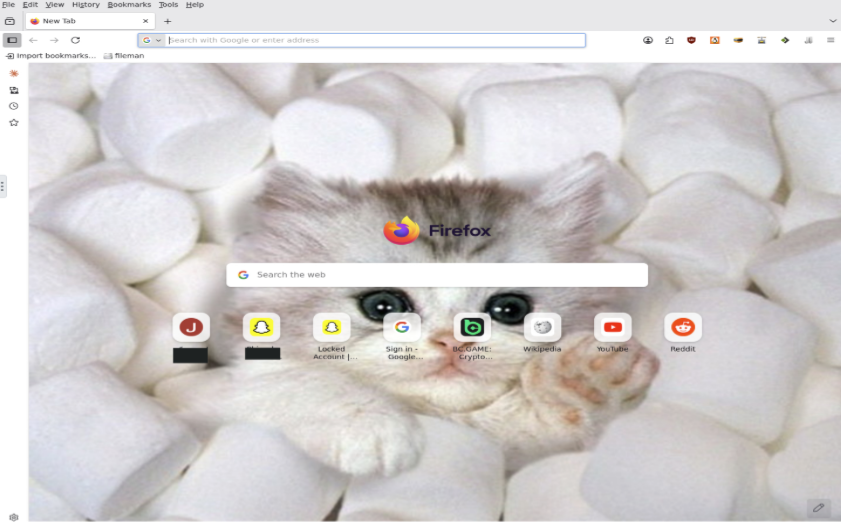
To illustrate why this matters, the workflow surfaced an entry called Firefox noVNC, which seemed odd. Pulling up some of the URLs confirmed it was literally Firefox running inside a VNC session. While some instances were password-protected, many were not, and a portion were actively running web-based crypto miners or logged into social media accounts.
The next sections cover two approaches I utilized to cross-check and validate the AI work; although AI is getting better every day, my trust issues are not.
Starting with Known Hashes: Nuclei Templates
Nuclei has a pretty good list of web favicons. It's not a secret that you can mine way more favicons than the favicon-detect template using other Nuclei template submissions. The project even did this themselves as covered in issue 912; they just didn't set up an action to continue their enrichment. The base logic in the mining is that when a user submits a template for a CVE, they may include the favicon hash as part of the metadata for the vulnerable product. Examples where the query just has the hash:
shodan-query: http.favicon.hash:<value>
fofa-query: icon_hash=<value>
Templates for CVEs are straightforward to tie to a product as they have CPEs associated. For example, you get progress-moveit_transfer from:
cpe: cpe:2.3:a:progress:moveit_transfer:*:*:*:*:*:*:*:*
Doing a pass with a script that searches if a template has a hash and then scrapes the CPE doubles the amount of Favicons that can be used and will provide the baseline for comparison when identifying whether my workflow is, well, working.
pHashing at Favicon Scale?
Perceptual hashing is designed to find visually similar images even after resizing or compression artifacts. I wanted to have pHashing serve as a visual double-check and a way to identify other favicons that are nearly identical to a known one, catching variations the AI enrichment workflow may not have reached yet.
At 16x16 or 32x32 pixels, favicons are already at the floor of meaningful visual information which is why I selected this to see if it worked at all. The approach proved hit or miss in practice. Looking at WordPress and cPanel, the pHash cluster surfaces several near-identical variants alongside the original, making it easy to confirm coverage or flag anything the agent missed. Sadly the pHashing only really worked well with favicons that look like letters and more abstract favicons returned nothing usable.
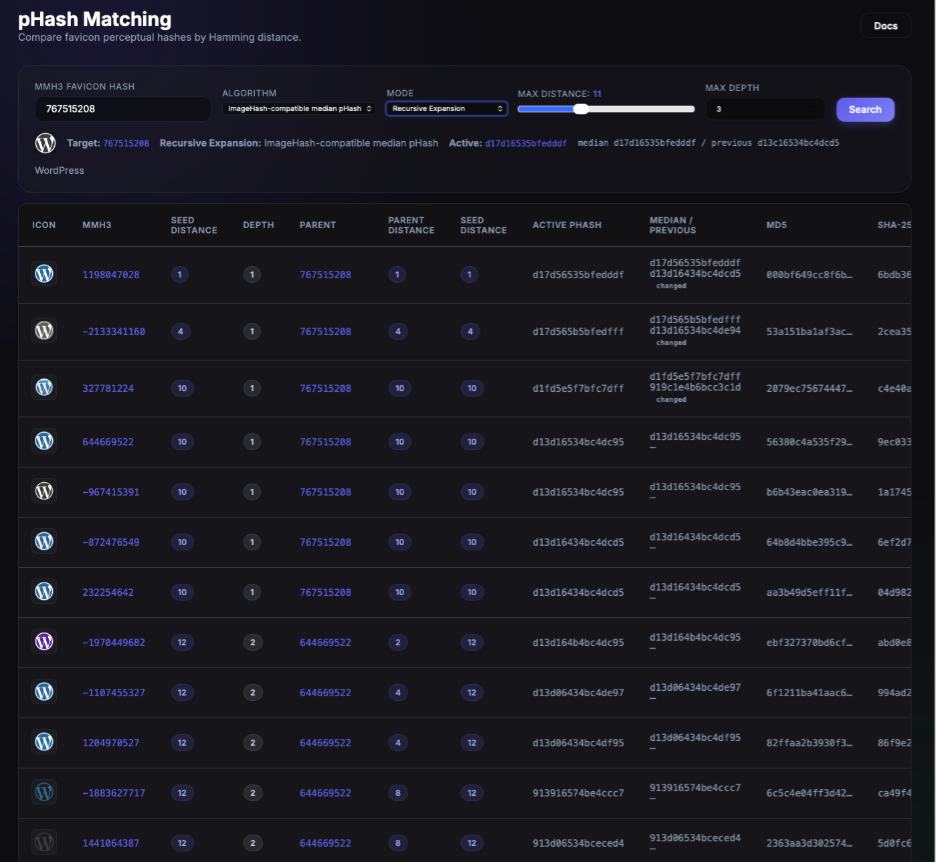
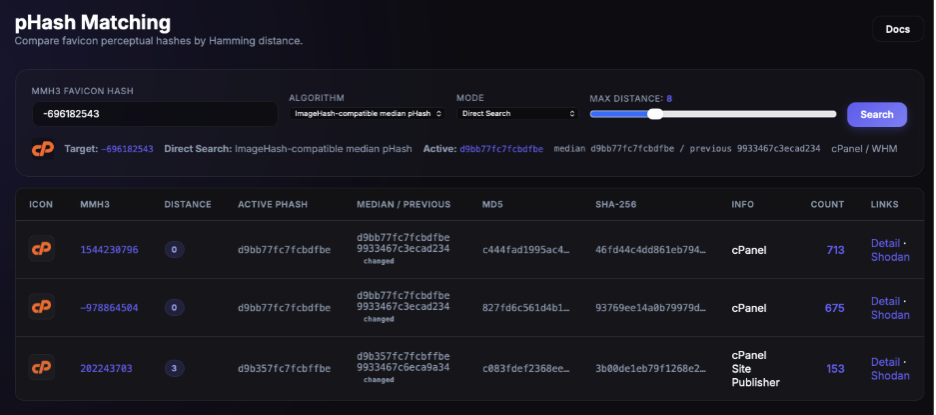
The approach could scale well with more investment (better algorithms, smarter clustering, visual preprocessing, someone who knows what they are doing), but as a check the effort-to-signal ratio wasn't worth digging into too deeply. One thing is pretty definitive: favicons can be SVGs so it surely won’t be universal. More detail on the pHashing methods tested, the clustering results, and what actually worked is available in the repo for anyone who wants to dig into the details.
Bring on the Bulk Data: Shodan
To fulfill my need to identify and prioritize which ones were popular, I downloaded Shodan data and then parsed and deduped them. With Shodan it's possible to get the HTML body, favicons, server headers, certs, and port/service metadata, giving a rich picture of each host alongside its favicon hash. In using Shodan there are trade-offs as I'm only getting the favicons Shodan pulled and as Shodan’s scanning targets IPs that is leaving out a lot of internet surface. It would be great to mine the Internet Archive or have web crawlers just going full time but this is a starting dataset.
The AI-Enabled Enrichment Workflow
I'm going to share the methodology which is all most people need to reproduce something now. It's also not overly complicated and is just an agent with 50 turns operating under a Stop-and-submit rule: Where at any point in the investigation, if the agent has enough confidence in the product identity — even after Step 1 alone — it submits immediately. The goal is a correct submission, not an exhaustive one.
My agent's skill prompt was my agent. Its full body is a single Markdown document, loaded as the system prompt at the start of every investigation. It was a custom agent framework that only did what was needed and only had the tools I wanted it to have.
Agent Toolbox
The agent runs a standard reasoning-plus-tool loop — it sees a tool catalog, emits a tool call, the result is appended to the message history, repeat. It had exactly five local tools.
Tool | What it actually does | When it gets used |
ShodanHashSearch | Calls the live Shodan API for the hash, appends -tag:honeypot to filter out known honeypot infrastructure, fetches up to 100 raw results, dedupes by HTML hash, and returns the top 10 page-template groups sorted by host count. Each group carries Title, Server, Components (technology fingerprints by Shodan Wappalyzer), CPEs in headers, SSL Cert CN, SSL Cert Issuer, sample URLs, and a path to a saved HTML file. Records the exact Shodan query total in the database even if zero results come back. | Step 1, every time. |
HeadlessBrowser | Custom headless browser tool. Fetches one sample URL plus an auto-generated 404 probe (/_favicon_probe_<8-hex>) on the same host in a single browser launch. Each snapshot includes status, final URL, Server / X-Powered-By headers, <title>, Meta Generator, Meta Application, Meta Description, OG Site Name, OG Title, Meta Powered-By, outbound links, and visible text. | Step 2, only when gated. |
SearchWeb | DuckDuckGo top-3 results for a query. | Supplementary only — never primary. |
VerifyCPE | POSTs 2–5 keywords to the cpe-guesser API, returns NVD CPE candidates. | Step 3, before any CPE gets written. |
SubmitCandidateForGrading | Writes a row into a candidate queue with field='http.favicon.hash' and value=<hash>. Does not write to the main stats table — that promotion is a human decision in the review UI. Also writes a short friendly name (≤3 words) to a names table. | Step 3, terminal. |
ShodanHashSearch grouping is what the entire workflow logic hinges on. The tool fetches raw results, sorts by IP/port sample, and deterministically groups hosts that share an HTML hash — a hash collision on the response body, not on the favicon. A favicon with 89/100 results returning the same Jira login page collapses into one group with 89 hosts attached to it. A favicon with 10 distinct homepages collapses into 10 small groups. This was the single most important signal in the entire pipeline: a tight grouping is product-level consistency, a loose grouping is either a generic favicon or in some cases a honeypot that rotates banners. You probably caught the logic flaw in the approach, it only picks one, and it picks the most popular, and it does it on a subset of a hundred - it’s not perfect.
browser tool is a headless Chromium that renders the page (not just a curl), so it handles JS-heavy SPAs that would otherwise look like a blank login. The 404 probe can surface some interesting things and can help tell a real product apart from a hosting-provider default (Vercel, Netlify, GitHub Pages, parking pages) or a captive-portal wildcard router.
SearchWeb is supplementary on purpose. It's tempting to lean on it to "just look it up" but the agent's primary identification signal is the Shodan groups themselves (title, components, server, hostnames, SSL cert CN and issuer). Web search is only for confirming a suspected CMS/framework or adding context to the notes — never for substituting the content evidence. When AI gets stuck it can search some pretty interesting things one of which might be looking up what is this favicon hash belong to. Nothing in the workflow requires giving the AI the real hash.
Walk-through: an unknown hash returns Fetched: 100 hosts | Unique HTML signatures: 1 | Showing: 1 group(s) with Title: Confluence, Server: Atlassian Router, Components: {Atlassian Confluence}, and 97 of 100 sample URLs on *.atlassian.net subdomains. That's a high-confidence identification as Atlassian Confluence — submit cpe:2.3:a:atlassian:confluence:*:*:*:*:*:*:*:* immediately, no further tool calls needed. By contrast, an unknown hash returning Fetched: 100 hosts | Unique HTML signatures: 100 | ALL_UNIQUE with groups that look like a MikroTik login, a FortiSwitch login, a Ray dashboard, and an EasyIO controller, on random ports, is pretty much the signature of a multi-vendor banner-rotating honeypot.
Honeypot and Parking-Page Special Cases
The workflow treats two categories separately because they look like "couldn't identify" but are actually identifiable:
- Honeypots require positive evidence of active deception, not just ambiguity. A favicon whose groups name 3+ unrelated vendors' products (FortiSwitch + MikroTik + Oracle + F5) is a honeypot — a real product doesn't appear on physical FortiSwitches, ML dashboards, building automation controllers, and Oracle app servers simultaneously. Cloud-hosted hardware appliances and port entropy (the same favicon on Modbus, InfluxDB, Steam, and MongoDB ports) are corroborating signals. The submission is name=Honeypot, cpe=UNKNOWN, with notes listing the conflicting products and the impossible server-header combinations. When in doubt, MISC — an honest "I can't identify this" is more valuable than a wrong honeypot label.
- Domain parking / hosting-provider placeholders get a submission. A favicon whose groups all return "this domain is parked" is submitted as <Company> Domain Parking with cpe=UNKNOWN.
I hand waved some of the logic but it was stuff like error handling when Shodan's API is not functioning. Also I wanted to include some things I tried that did not work:
- AI image analysis tool. The first iteration of the pipeline had a vision tool that asked the LLM to "look at the favicon and tell me what it is." It only produced errors and the occasional confidently-wrong guess. Identifying an icon from pixels is a hard vision problem; the value comes from the network of hosts that share the icon, not from the icon itself. The tool was cut as it only lead to false positives.
- Browse-first strategies. An early version opened the browser on every investigation. The vast majority of cases were solved by the Shodan groups alone, and the browser was just wasting time. But this is one of the reasons I gated the tool use until a certain step was just to make sure the AI had a reason to use the tool.
- Submitting without verifying the CPE. Letting the agent write a CPE string without confirming it exists in the NVD database via cpe-guesser made for some plausible-looking but very made up CPEs. VerifyCPE is now mandatory before any CPE gets written; if cpe-guesser returns no match, the product either has no NVD entry (use UNKNOWN + a descriptive name) or the agent got the product wrong.
- VerifyCPE can over-specify. As cpe-guesser returns the most specific CPE it has, for products with no wildcard CPE entry the agent can pick a too-specific model. FortiGate as an example — the NVD entries are model-specific (FortiGate 100F, FortiGate 60F, etc.), so when the agent submits, it submits a specific appliance model rather than a vendor-level identifier. Worth a manual review pass on the output if you are using the CPE column for CVE matching or vendor rollups.
- Tag enrichment skill (parked). I built a secondary enrichment skill that would add tags to entries with no CPE — things like firewall, cisco, cms. It was not really utilized. The pool of tags wasn't good enough for filtering on them to be meaningful. I might bring it back later, but for now it is parked and it will probably replace the CPE and I'll just have CPE as a tag.
Analysis Dashboard
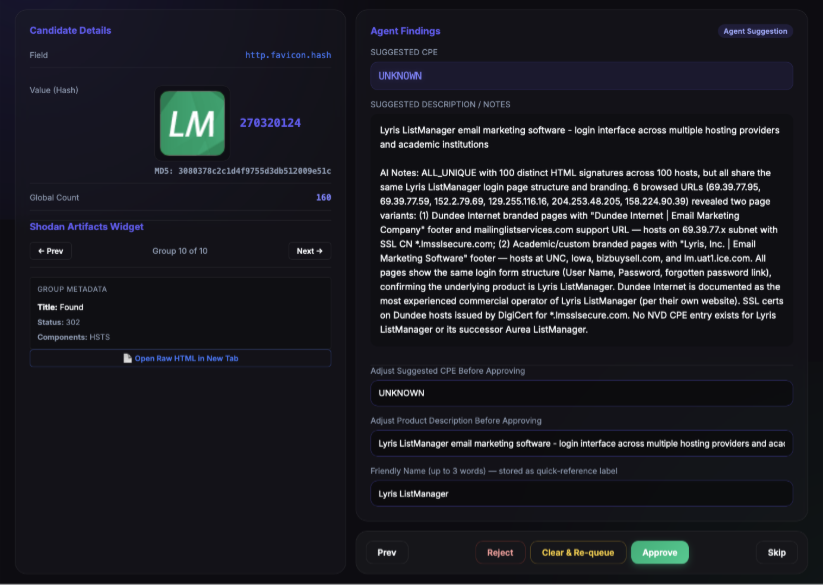
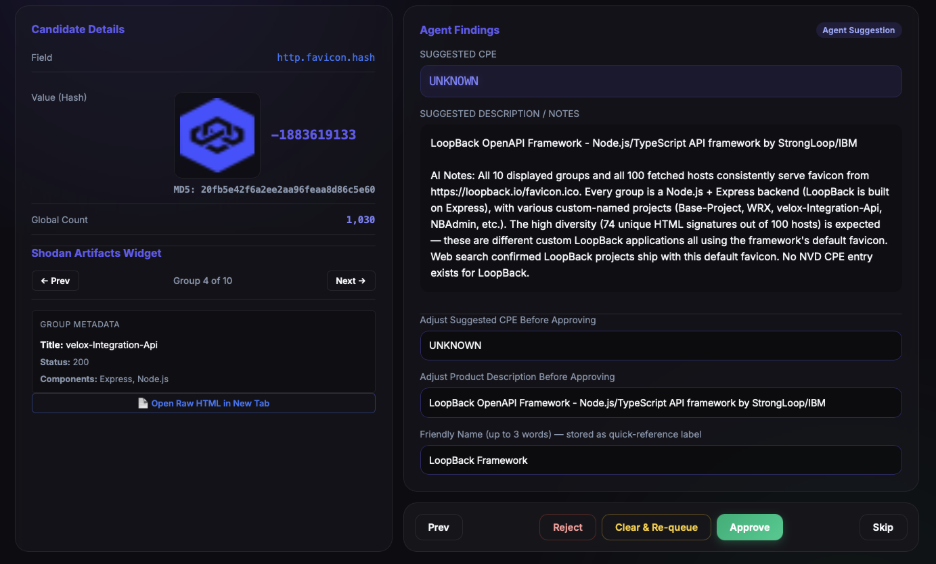
The agent submissions land in a web dashboard for review, where every tool call the agent made and its reasoning between calls are displayed for manual verification. Each row is one submission — hash, proposed CPE, description, friendly name, and the full evidence chain in notes — and the operator approves, rejects, or edits before anything is promoted to the main dataset.
I took this part very seriously at first and read every submission. After about the thousandth favicon I started to doubt my intelligence and also the need to verify so strictly. While I slept, the AI did not, and I soon was drowning in thousands of responses and had to start trusting the work a lot more as the human-review step became the bottleneck.
The Dataset and Results
I went back and forth about putting numbers in since popularity and is a point-in-time snapshot of what Shodan and the database has indexed. As stated, Shodan collects by IP, not by domain, which biases the dataset toward hosts with stable direct addressing — CDN-fronted, SNI-rotated, and anycast-heavy infrastructure is systematically under-counted because the same favicon hash can be served from a much larger host pool than Shodan sees. Favicons with low global count can only be said to be low on Shodan. In the working data set, there were over three million favicon entries. Around 60% were reached from /favicon.ico (the default path).
On the mime-type distribution of the decoded favicons in the dataset, one point-in-time:
Detected as | MIME | Count | % of total |
png | image/png | 2,606,913 | 84.45% |
ico | image/vnd.microsoft.icon | 414,539 | 13.43% |
jpeg | image/jpeg | 42,194 | 1.37% |
webp | image/webp | 13,755 | 0.45% |
gif | image/gif | 5,815 | 0.19% |
bmp | image/bmp | 2,550 | 0.08% |
svg | image/svg+xml | 1,117 | 0.04% |
unknown | application/octet-stream | 119 | 0.00% |
xml_or_html | text/xml | 4 | 0.00% |
ico | image/x-tga | 3 | 0.00% |
jp2 | image/jp2 | 2 | 0.00% |
ico | image/x-win-bitmap | 1 | 0.00% |
unknown | image/vnd.adobe.photoshop | 1 | 0.00% |
This is what I'm releasing for now. This post is the methodology. The accompanying repo will carry, for every hash in the published list:
- The Shodan-compatible MMH3 hash.
- The MD5 and SHA-256 of the stored favicon bytes.
- The top two favicon asset paths Shodan observed that hash at, when available — this is the per-hash favicon-location set and is a strong signal in its own right (the same hash on /favicon.ico and /assets/icons/favicon.png is a deployment worth knowing about).
- An AI description for the hashes the agent has covered.
- A CPE attempt, AI-attributed and to be taken with a grain of salt.
- A short companion file with the most popular favicon paths and some less-obvious places to look beyond the head of /favicon.ico.
Missed Opportunities (or How I Would Improve)
- Collect additional favicons and paths from every browser visit. The headless browser is already at the host with the DOM loaded, so it should be extracting every favicon-adjacent reference the page exposes: <link rel="icon">, <link rel="apple-touch-icon">, manifest.json icon arrays, inline base64 favicons, and the full range of non-default paths products actually use. Each of those is a candidate hash from a different deployment surface of the same product, and a meaningful number will differ from the hash the agent was originally sent to investigate. Done at agent scale, this would add significant coverage the Shodan ingest alone won't catch.
- Fuzzier HTML grouping with Levenshtein (or similar). My HTML hashing was stricter than it needs to be. Running Levenshtein distance on the stripped response body and merging groups below a conservative threshold would catch those near-duplicates, though the threshold needs care since two different products' login pages can sit very close together in edit-distance terms. The upside is real: tighter grouping means more reliable signal and would have caught some of the borderline unknown.
- The curse of the generic. A meaningful number of favicons are so generic, whether a stock logo, a default placeholder, or a vendor-neutral icon set, that there is no real product to attribute them to and no value in spending agent budget on them.
- Human-in-the-loop should be utilized. The grading workflow has the agent submit and the human approves, rejects, or edits, and most of my grading was smacking things down. What I lacked was the ability to re-cue the investigation with my new feedback: to be able to point at the part that made me reject it and ask the agent to find more evidence, argue against its own conclusion, or revisit a specific signal. I wasn’t in a loop and was just gatekeeping acceptance and that was shortsighted. My input matters!
Conclusion
What began as a party trick became a repeatable way to map software across the internet from a single sixteen-by-sixteen-pixel image. Favicons will never be proof on their own, serving instead as indicators rather than verdicts. However, as a passive, scalable starting point for narrowing an attack surface, they remain one of the most underrated signals available to attackers and defenders alike.
There is also a less serious reason I think the visual dataset is worth sharing: it is fun to browse. When I sent it to a coworker, he treated it less like a research tool and more like a game, scrolling through the icons to see which products he recognized, which ones he had never heard of, and which AI-generated descriptions felt just slightly off. Some entries are useful, some are weird, and some are interesting because you can see where the AI’s reasoning leaked into the description and stayed there. That reaction stuck with me because it captured a second value of the dataset: even when it is not directly useful, it is still a surprisingly entertaining way to explore the software ecosystem hiding behind tiny browser icons.
The dataset and methodology are in the repo. Pull a hash, see what it maps to, and let me know which missed opportunity you chase down first.

Subscribe to our blog
Be first to learn about latest tools, advisories, and findings.
Thank You! You have been subscribed.
Recommended Posts
You might be interested in these related posts.
One Port to Root: Weaponizing Check Point Management CVE-2026-93616
Master Key Included: Detecting SolarWinds ARM CVE-2026-28326
Unified Code, Unified Risks: Uncovering Vulnerabilities in .NET MAUI Applications