


TL;DR
- Entra ID’s most restrictive guest settings block guests from enumerating Entra directory objects (users, groups, devices, applications, etc.), but it is possible to enumerate applications by traversing known application IDs with HTTP GET requests.
- Cirro (v1.4.0) now supports limited enumeration of Entra applications and service principals as a restricted guest user.
Summary
Microsoft Entra ID allows organizations to invite external users such as contractors, partners, and customers as B2B guests. These users receive a guest account in the organization’s tenant. Administrators can then control how much directory information those guests can see through three guest-access settings:
- Member-equivalent access (least restrictive): Guests receive the same default directory visibility as ordinary members.
- Limited access (default): Guests have reduced visibility into directory objects and cannot broadly enumerate users or groups but can still view membership information for non-hidden groups.
- Restricted access (most restrictive): Guests are intended to see only their own profile. They cannot view other users’ profiles or group member lists, including membership lists for groups they belong to.
Microsoft documents these three levels here. Interestingly, the restricted guest permissions allow for reading properties of registered and enterprise applications as well as the permissions granted to applications. This means that despite being unable to list applications and service principals, a restricted guest user can still view the properties of them.
For demonstration purposes throughout this post, I have already authenticated to my test tenant (tenant id: 39c349ef-6874-44a6-be31-c4c198a86b66) as a guest user. The tenant is configured with the most restrictive guest user settings.
Enumerating Microsoft Graph
In addition to Cirro, there are other tools used to enumerate Microsoft Graph directory objects such as AzureHound and ROADtools. These tools use the same method of paging through Microsoft Graph API requests for different directory object types. For example, the following endpoints return the type of object they request:
GET /v1.0/users
GET /v1.0/applications
GET /v1.0/servicePrincipals
If the identity used in the request has permissions for these endpoints, the directory objects are returned.
However, a guest with restricted settings does not have the permission to perform enumeration with this method:
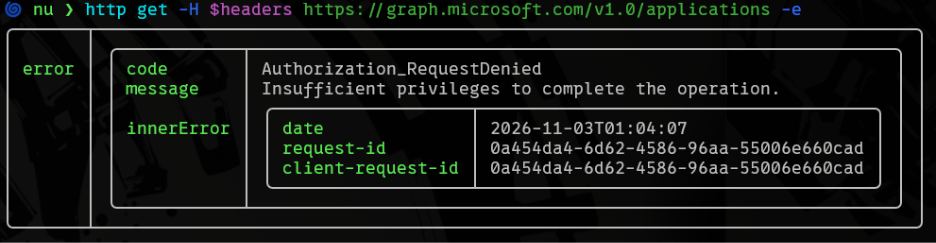
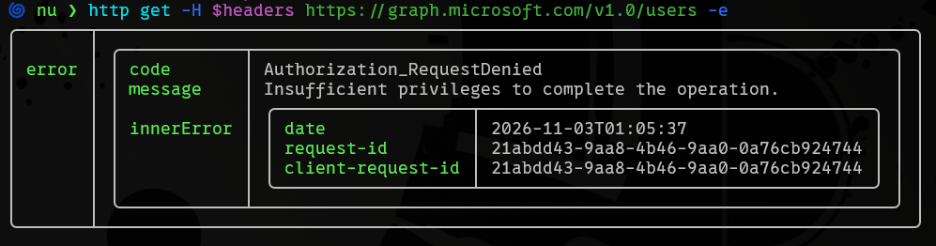
This means that existing tools do not support traditional Microsoft Graph enumeration. However, as the documentation states, even restricted guest users can view the properties and permissions of an application. So how can we enumerate applications without knowing which applications exist within a tenant?
How Entra Applications Work
An Entra application is represented by two related objects. The application object, managed under App registrations, defines the application’s identity configuration, including its sign-in audience, redirect URLs, credentials, and exposed permissions. Its application ID (also called the client ID or appId) identifies the application globally. A service principal, managed under Enterprise applications, represents that application inside a particular tenant. It provides the local identity associated with permissions, consent, and user assignments. Each service principal has its own object ID, distinct from the global appId.
A multitenant application is configured to accept identities from organizations beyond the tenant where it was registered. A vendor can maintain one application registration while customer tenants receive their own service principals for it. Those instances share the same appId, but have different service-principal object IDs and tenant-specific grants.
Well-known client IDs are publicly documented application IDs for recognizable applications and services. Microsoft Graph, for example, uses the application ID 00000003-0000-0000-c000-000000000000. Many well-known client IDs are typically found in every tenant. For example, Exchange Online (00000002-0000-0ff1-ce00-000000000000) and SharePoint Online (00000003-0000-0ff1-ce00-000000000000) are common Microsoft-owned services used by millions of users.
An application can expose app roles describing permissions within that application. A business application might define Reader or Administrator roles for users, while an API can expose roles assignable to other applications. Microsoft Graph’s application permissions, such as Directory.Read.All, are implemented this way.
Each role definition has an ID, a permission value, and allowedMemberTypes, which determines whether users/groups, applications, or both can receive it. These definitions appear in the appRoles property. For example, Microsoft Graph contains a ton of app roles:
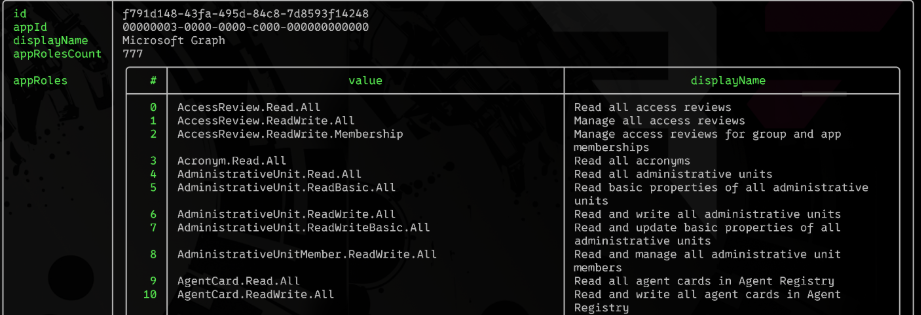
The presence of app roles means permissions are available but not that they have been assigned. Assignments are handled in a different property called appRoleAssignedTo that can be enumerated with a similar HTTP GET request:
nu ❯ http get -H $headers "https://graph.microsoft.com/be...(appId='00000003-0000-0000-c000-000000000000')/appRoleAssignedTo" -e | to json
{
  "@odata.context": "https://graph.microsoft.com/be...",
  "value": [
    {
      "id": "-bi-XDwkPEairBAO4oD4w-0yvZhiJhlCnHNbIeyGwAU",
      "deletedDateTime": null,
      "creationTimestamp": "2026-11-03T01:46:59.6990982Z",
      "appRoleId": "7ab1d382-f21e-4acd-a863-ba3e13f7da61",
      "principalDisplayName": "Graph AppRole Permission",
      "principalId": "5cbeb8f9-243c-463c-a2ac-100ee280f8c3",
      "principalType": "ServicePrincipal",
      "resourceDisplayName": "Microsoft Graph",
      "resourceId": "f791d148-43fa-495d-84c8-7d8593f14248"
    }
  ]
}
This request returns a previously unknown service principal named “Graph AppRole Permission” and its object ID. At this point, we’ve identified that the common Microsoft Graph application ID exists in this tenant and that the Graph AppRole Permission service principal exists with assigned permissions. The next logical step is to enumerate this new service principal using its object ID:
nu ❯ http get -H $headers "https://graph.microsoft.com/be..." -e | to json
{
  "@odata.context": "https://graph.microsoft.com/be...",
  "id": "5cbeb8f9-243c-463c-a2ac-100ee280f8c3",
  "deletedDateTime": null,
  "accountEnabled": true,
  "alternativeNames": [],
  "createdByAppId": "18ed3507-a475-4ccb-b669-d66bc9f2a36e",
  "createdDateTime": "2026-11-03T01:43:48Z",
  "deviceManagementAppType": null,
  "appDescription": null,
  "appDisplayName": "Graph AppRole Permission",
  "appId": "4efbc5fa-3d38-4fbc-92d1-c02f10094a9d",
  "applicationTemplateId": null,
  "appOwnerOrganizationId": "39c349ef-6874-44a6-be31-c4c198a86b66",
  "appRoles": [
    {
      "allowedMemberTypes": [
        "User",
        "Application"
      ],
      "description": "Dummy Permission Check",
      "displayName": "Permission Check",
      "id": "af122980-596c-41ef-b6e2-2702d5d0a52b",
      "isEnabled": true,
      "origin": "Application",
      "value": "Permission.Check.All",
      "isPreAuthorizationRequired": false,
      "isPrivate": false
    }
  ]
…omitted for brevity…
}
There are a few things we can observe from this response. First, the appOwnerOrganizationId property is my own tenant ID. Therefore, we can assume that is an internal application. This can also be confirmed by making a request for the application object itself:
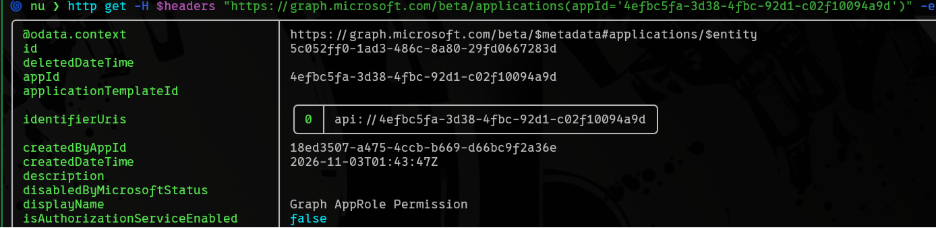
Second, this application has its own app roles. Therefore, we can assume that there is likely yet another application with permissions to the Graph AppRole Permissions application. We can confirm this through additional iteration by querying this application’s app role assignments in the same manner as we did Microsoft Graph:
nu ❯ http get -H $headers "https://graph.microsoft.com/be...(appId='4efbc5fa-3d38-4fbc-92d1-c02f10094a9d')/appRoleAssignedTo" -e | to json
{
  "@odata.context": "https://graph.microsoft.com/be...",
  "value": [
    {
      "id": "-BQrD-MbI0mnB9zBnYSFnCFkzNAF53lDvdvwrxy8ttY",
      "deletedDateTime": null,
      "creationTimestamp": "2026-11-03T01:44:19.922707Z",
      "appRoleId": "00000000-0000-0000-0000-000000000000",
      "principalDisplayName": "Global Admin",
      "principalId": "0f2b14f8-1be3-4923-a707-dcc19d84859c",
      "principalType": "User",
      "resourceDisplayName": "Graph AppRole Permission",
      "resourceId": "5cbeb8f9-243c-463c-a2ac-100ee280f8c3"
    },
    {
      "id": "ZND3-8_L40qU6swK_Kt3Fuc-yq8iPvVGu9iQQxey3lc",
      "deletedDateTime": null,
      "creationTimestamp": "2026-11-03T01:54:46.7089373Z",
      "appRoleId": "af122980-596c-41ef-b6e2-2702d5d0a52b",
      "principalDisplayName": "Cirro Reply Url Demo",
      "principalId": "fbf7d064-cbcf-4ae3-94ea-cc0afcab7716",
      "principalType": "ServicePrincipal",
      "resourceDisplayName": "Graph AppRole Permission",
      "resourceId": "5cbeb8f9-243c-463c-a2ac-100ee280f8c3"
    }
  ]
}
This returns both a user and another service principal! Fantastic. Due to our restricted settings, we are unable to gather additional information about the user other than the data returned from this request since we can’t query Microsoft Graph for users. I was unable to find any other paths or expanded properties that would return more user information. However, we can perform another iteration on the Cirro Reply Url Demo service principal to obtain more information about its configuration. We’ll come back to this service principal in a bit.
New Feature in Cirro
As mentioned in the TL;DR, Cirro now supports enumeration of applications and service principals as a guest user under restricted settings. Let’s try with the new –restricted-guest flag:
🌀 nu ❯ ~/repos/cirro/target/dist/cirro collect az access-token --token $token --restricted-guest
   ___      _
  / __|    (_)      _ _     _ _    ___
 | (__     | |     | '_|   | '_|  / _ \
  \___|   _|_|_   _|_|_   _|_|_   \___/
_|"""""|_|"""""|_|"""""|_|"""""|_|"""""|
"`-0-0-'"`-0-0-'"`-0-0-'"`-0-0-'"`-0-0-'
[*] Using token with audience: https://graph.microsoft.com/
[*] Starting with Access Token credentials
[*] Using cloud: Public
[*] Using mode: Graph
[*] Using output: "cirro_output.db"
[*] Starting restricted-guest Graph enumeration with 18 application ID
seed(s)
[*] Enumerating 00000002-0000-0000-c000-000000000000: Windows Azure
Active Directory
[*] Enumerating 00000002-0000-0ff1-ce00-000000000000: Office 365
Exchange Online
[*] Enumerating 00000003-0000-0000-c000-000000000000: Microsoft Graph
[*] Enumerating 00000003-0000-0ff1-ce00-000000000000: Office 365
SharePoint Online
[*] Enumerating 00000004-0000-0ff1-ce00-000000000000: Skype for
Business Online
[*] Enumerating 00000007-0000-0000-c000-000000000000: Dataverse
[*] Enumerating 00000009-0000-0000-c000-000000000000: Power BI Service
[*] Enumerating 0000000a-0000-0000-c000-000000000000: Microsoft Intune
[*] Enumerating 04b07795-8ddb-461a-bbee-02f9e1bf7b46: Microsoft Azure
CLI
[*] Enumerating 1950a258-227b-4e31-a9cf-717495945fc2: Microsoft Azure
PowerShell
[*] Enumerating 1fec8e78-bce4-4aaf-ab1b-5451cc387264: Microsoft Teams
[*] Enumerating 499b84ac-1321-427f-aa17-267ca6975798: Azure DevOps
[*] Enumerating 797f4846-ba00-4fd7-ba43-dac1f8f63013: Windows Azure
Service Management API
[*] Enumerating c44b4083-3bb0-49c1-b47d-974e53cbdf3c: Azure Portal
[*] Enumerating cfa8b339-82a2-471a-a3c9-0fc0be7a4093: Azure Key Vault
[*] Enumerating d3590ed6-52b3-4102-aeff-aad2292ab01c: Microsoft Office
[*] Enumerating d4ebce55-015a-49b5-a083-c84d1797ae8c: Microsoft Intune
Enrollment
[*] Enumerating e406a681-f3d4-42a8-90b6-c2b029497af1: Azure Storage
[*] Restricted-guest Graph enumeration completed: 12 seed(s) found, 6
missing, 0 blocked; 14 service principal(s), 2 application(s), 3 OAuth
grant(s), 6 app-role assignment(s), 0 incomplete relationship(s), 0
unresolved service principal(s)
[*] All enumeration tasks completed
[*] Sending shutdown message to DB writer
[*] Done
In this mode, Cirro seeds with 18 well-known application IDs and performs the iteration described. As a result, we identified that 12 of those seeds exist, 14 service principals were enumerated (including the seeds), two additional applications were found (in this case, Graph AppRole Permission and Cirro Reply Url Demo), three OAuth permissions grants (delegated permissions), and six app role assignments.
There are two optional flags that can be passed when enumerating as a restricted guest. First, if you know of any additional application IDs, you can specify them with the --restricted-appids flag. These app IDs are usually SaaS products, so if you are aware that an organization uses a specific third-party application, this may lead to additional enumeration. The second optional flag is --restricted-guest-msapps. This increases the seed list from 18 to 1753 well-known applications. These application IDs were sourced from the EntraScopes project. Here are the results of running Cirro with this flag as the same restricted guest:
[*] Restricted-guest Graph enumeration completed: 341 seed(s) found, 1412 missing, 0 blocked; 343 service principal(s), 2 application(s), 11 OAuth grant(s), 6 app-role assignment(s), 0 incomplete relationship(s), 0 unresolved service principal(s)
Instead of only 12 applications, Cirro identified 341, with 2 service principals/applications (again, Graph AppRole Permission and Cirro Reply Url Demo) with 11 delegated permissions identified (as opposed to three earlier).
So What?
So, what is the impact of a guest user being able to enumerate these applications? Information disclosure is always useful for attackers but being able to enumerate these applications does not mean the guest user will have access to them. Here are two interesting techniques for an attacker:
If the attacker can identify multi-tenant applications that allow any tenant to authenticate to it, this provides an opportunity for an attacker to identify any vulnerabilities in the application’s functionality. Of course, this depends on the application itself being insecure and may be a bit of a long shot. However, misconfigurations happen and applications that are not intended to be made public sometimes are.
Reply URL (or Redirect URI) hijacking is a much more likely scenario. This requires identifying applications with reply URLs that are no longer maintained by the owner can be registered by the attacker. Depending on the configuration of the application, the delegated permissions assigned, and the type of tokens granted in the OAuth flow, an attacker that can identify a misconfigured reply URL can use the compromised domain as a phishing link to obtain access tokens for the application in the context of the victim.
Remember the application from earlier? Let’s look at the interesting fields:
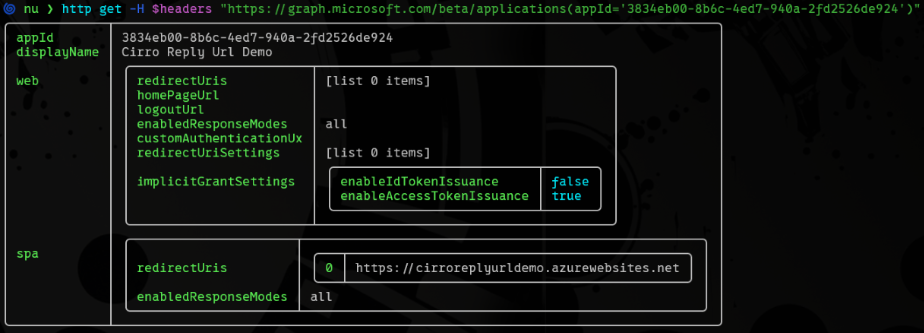
First, we identify that the authentication flow issues access tokens and that the application has a redirect URI for hxxps://cirroreplyurldemo.azurewebsites.net. Then we perform a DNS lookup to see if it resolves. If it does not resolve, then we can check to see if we can register it ourselves:
nu ❯ dig cirroreplyurldemo.azurewebsites.net
; <<>> DiG 9.20.30-1~deb13u1-Debian <<>> cirroreplyurldemo.azurewebsites.net
;; global options: +cmd
;; Got answer:
;; ->>HEADER<<- opcode: QUERY, status: NXDOMAIN, id: 24331
;; flags: qr aa rd ra; QUERY: 1, ANSWER: 0, AUTHORITY: 1, ADDITIONAL:
1
;; OPT PSEUDOSECTION:
; EDNS: version: 0, flags:; udp: 1232
;; QUESTION SECTION:
;cirroreplyurldemo.azurewebsites.net. IN        A
;; AUTHORITY SECTION:
azurewebsites.net.      7       IN      SOA     ns1-224.azure-dns.com.
msnhst.microsoft.com. 2029458736 900 300 604800 60


$ az rest --method post --url "https://management.azure.com/s...;(az
account show --query id -o
tsv)/providers/Microsoft.Web/checknameavailability?api-version=2025
03-01" --body
'{"name":"cirroreplyurldemo","type":"Microsoft.Web/sites"}'
{
  "message": "",
  "nameAvailable": true,
  "reason": ""
}
Depending on MFA requirements and Conditional Access policies, a reply URL hijack can lead to a zero-click or one-click compromise of a user’s context to that specific application.
What Should Defenders Do?
Administrators might not expect that a guest would be able to enumerate applications and service principals when the most restricted settings are in place. As mentioned earlier, this behavior is documented. However, this type of activity and enumeration is certainly unusual. It is highly recommended that defenders create baselines for Microsoft Graph traffic. Specifically, since guest users should not need to request all these applications, defenders should determine when a reasonable threshold of activity is met and apply the thresholds per account (if feasible). Querying hundreds of applications is likely not legitimate behavior.
It would be important (and less of a hassle) to ensure that the thresholds check for distinct application or service principal IDs, since that is more indicative of broad enumeration than a bunch of requests for a single application.
Responsible Disclosure
Since this behavior is documented, there didn’t appear to be a need for responsible disclosure. However, I believe this behavior should be further documented so that administrators and defenders understand the full risk of the resulting information disclosure, even though the true risks require additional misconfigurations or vulnerabilities. In the spirit of ethics, here is the timeline:
- July 30, 2026 – Submitted case to MSRC.
- September 21, 2026 – Requested update. None provided.
- October 27, 2026 – Requested update. None provided.
- November 05, 2026 – Public release of Cirro features

Subscribe to our blog
Be first to learn about latest tools, advisories, and findings.
Thank You! You have been subscribed.
Recommended Posts
You might be interested in these related posts.
A Journey into Claude's Sandbox
Responder Guidance for PHP2Shell (CVE-2026-109618 and CVE-2026-109619)

Submit and Execute: Weaponizing Reflected XSS in Siemens Teamcenter's Login Redirect (CVE-2026-58113)